// module.hero.order-sort

04

YOUR PICKERS ARE
WASTING TIME
FINDING ORDERS_

Mixed order queues slow fulfillment down. Order Sort By Category fixes it — inside the WooCommerce order screen you already use.

[ ORDER SORT BY CATEGORY ] PLUGIN · V1.0.0 WOOCOMMERCE NATIVE FREE DOWNLOAD
[ FREE PLUGIN ] [ FREE DOWNLOAD ] [ FREE FOREVER ]

// FREE PLUGIN · FREE DOWNLOAD · FREE FOREVER · NO LICENSE KEY · WOOCOMMERCE 6.0+ · CANTSTOP.DEV

← BACK TO PLUG-INS

// problem.statement

THE PROBLEM WITH MIXED ORDER QUEUES

When every order is a mix of product categories, your pickers spend half their time switching context. Apparel in aisle 3, tools in aisle 12, electronics in aisle 7 — bouncing between them isn't fulfillment. It's chaos.

AISLE SWITCHING CONSTANT

PICKER FOCUS FRAGMENTED

THROUGHPUT IMPACT -30% TO -50%

┌──────────────────────────────────┐
│  MIXED QUEUE — NO FILTER         │
│                                  │
│  ORDER #1042 ── APPAREL + TOOLS  │
│  ORDER #1043 ── ELECTRONICS      │
│  ORDER #1044 ── APPAREL          │
│  ORDER #1045 ── TOOLS + APPAREL  │
│  ORDER #1046 ── ELECTRONICS      │
│  ORDER #1047 ── FOOD + APPAREL   │
│                                  │
│  PICKER TASK: "...find apparel"  │
│  AISLE SWITCHES PER PICK: 6      │
│  TIME LOST PER SHIFT: ~90 MIN    │
│  ERRORS FROM CONTEXT-SWITCHING:↑ │
└──────────────────────────────────┘

// solution.introduced

SORT BY CATEGORY.
PICK FASTER.
ZERO COST._

Order Sort By Category adds category-based filtering and segmentation directly to your WooCommerce order management screen. No new dashboards. No third-party tools. Your team filters the queue by category, works the batch, and moves on. That's it.

01

OPEN YOUR
ORDER QUEUE

Standard WooCommerce orders screen. No new interface.

LOCATION: WC ADMIN

02

FILTER BY
CATEGORY

Select a category. Queue instantly segments.

CLICK: ONE FILTER

03

PICK CLEAN
BATCHES

Your team works one category at a time. No aisle-switching.

RESULT: SPEED

// module.specs

SYSTEM SPECS // order-sort-by-category
PLUGINORDER SORT BY CATEGORY
VERSIONv1.0.0
LICENSEFREE
TYPEWORDPRESS PLUGIN

USE CASES

  • Split shipping workflows by category (apparel vs. hard goods, etc.)
  • Prep category-specific pick runs for warehouse staff
  • Support daily order triage for operations managers

IMPLEMENTATION NOTES

  • Works inside WooCommerce order management workflows.
  • Designed as a low-friction utility with minimal configuration.

// module.features

CATEGORY-FIRST ORDER CONTROL

Turn your WooCommerce order screen into a category-first execution dashboard — without leaving your existing workflow.

  • Filter and prioritize orders by product category in seconds without leaving core WooCommerce
  • Route category-specific work to the right station or shift before fulfillment bottlenecks appear
  • Give managers instant visibility into category demand so staffing decisions are based on real queue pressure

FILTER SCOPE .......... PRODUCT CATEGORY / ORDER QUEUE

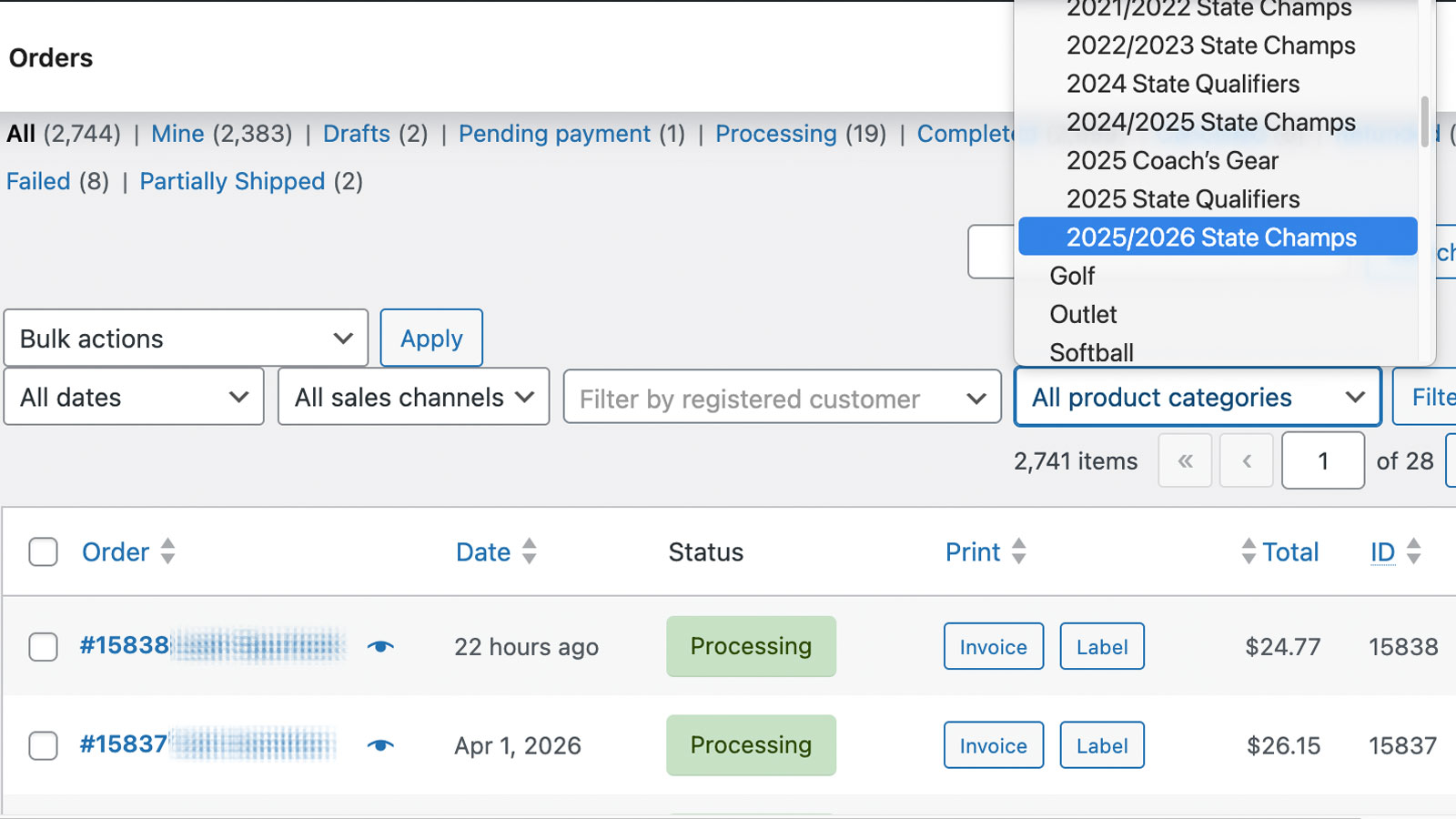
WooCommerce orders table with Order Sort By Category filter controls enabled. SCREEN.01

ORDER.LIST.CATEGORY.FILTER

QUEUE SEGMENTATION FOR FULFILLMENT SPEED

Build category-aligned pick batches that match your real shelf layout, cart flow, and picker movement.

  • Build category-aligned batches that reduce aisle-jumping and route fragmentation
  • Improve batch consistency so every shift starts with a clear, repeatable fulfillment plan
  • Protect SLA performance during surges by keeping the queue structure operationally predictable

BATCH TYPE .......... CATEGORY-ALIGNED / WAVE-READY

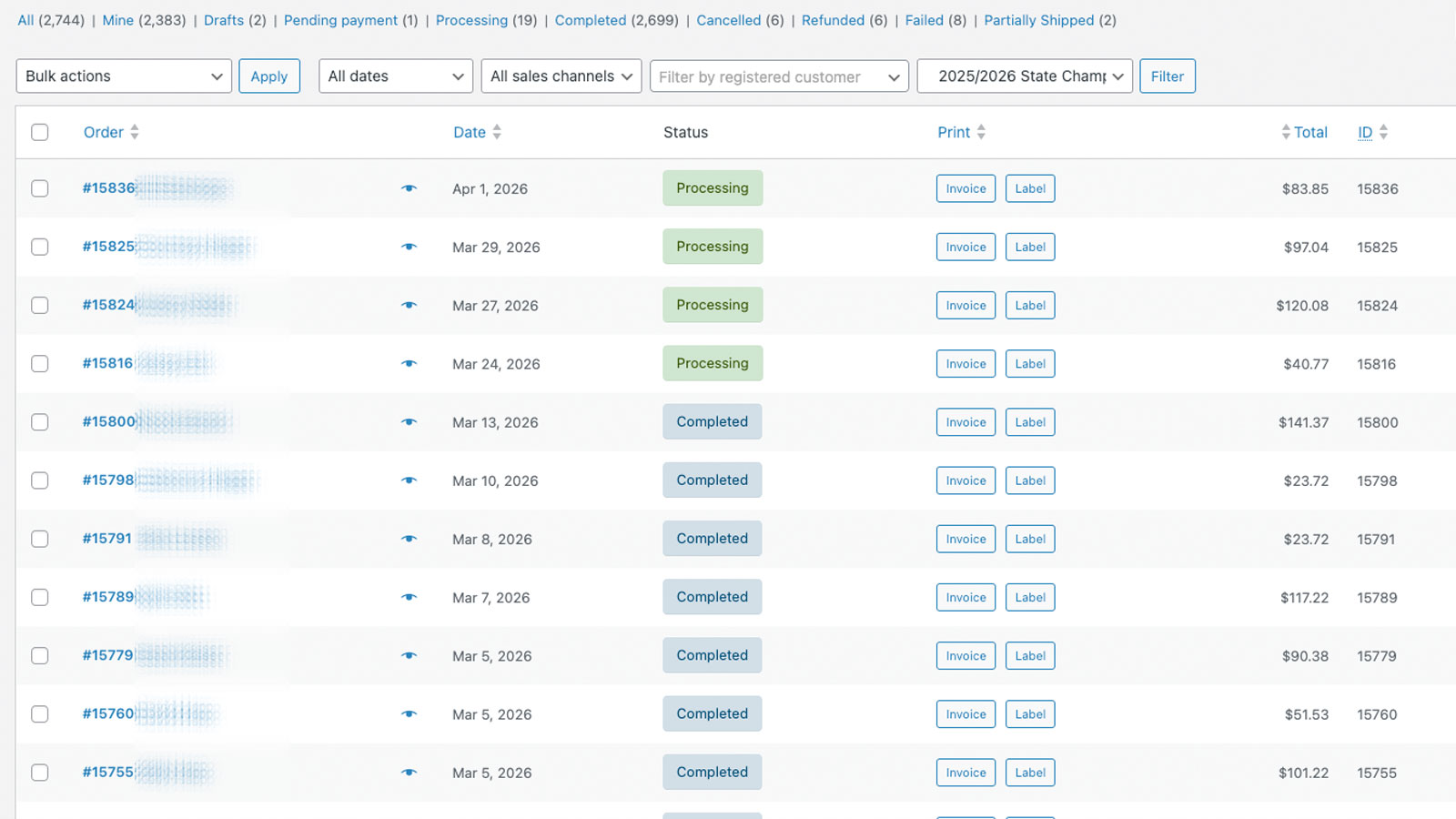
WooCommerce order queue after filtering by product category. SCREEN.02

FILTERED.QUEUE.RESULTS

OPERATOR-TIME RECOVERY

Recover hours every week by eliminating repetitive queue cleanup and replacing it with fast, structured category triage.

  • Cut repetitive filtering and ad-hoc sorting tasks that steal time from high-value fulfillment work
  • Standardize daily triage so new and experienced team members execute the same way
  • Unlock more output from existing headcount before resorting to overtime or additional hiring

TIME RECOVERED .......... EST. 60–90 MIN/SHIFT

┌──────────────────────────────────┐
│  AFTER ORDER SORT BY CATEGORY    │
│                                  │
│  SELECT: [ APPAREL ]             │
│    ↓                             │
│  QUEUE: 47 APPAREL ORDERS        │
│    ↓                             │
│  PICKER → AISLE 3 → DONE         │
│                                  │
│  SELECT: [ ELECTRONICS ]         │
│    ↓                             │
│  QUEUE: 23 ELEC. ORDERS          │
│    ↓                             │
│  PICKER → AISLE 7 → DONE         │
│                                  │
│  AISLE SWITCHES: 0               │
│  CONTEXT SWITCHES: 0             │
│  TIME SAVED: ~90 MIN/SHIFT       │
└──────────────────────────────────┘

// module.showcase

SEE IT IN YOUR ORDER SCREEN_

Order Sort By Category operates entirely within WooCommerce admin. Your team sees a familiar interface — just faster and more organized.

WooCommerce orders table with Order Sort By Category filter controls enabled. SCREEN.01

ORDER.LIST.CATEGORY.FILTER

Order list view with category filter controls visible and actively set.

WooCommerce order queue after filtering by product category. SCREEN.02

FILTERED.QUEUE.RESULTS

Filtered queue state showing category-specific order segmentation for cleaner picking.

// module.use-cases

WHO THIS HELPS_

[ USE CASE 01 ]

FULFILLMENT MANAGERS

Running multi-category pick operations where mixed queues create bottlenecks and aisle-switching slows every shift.

WHAT THEY NEEDQUEUE CONTROL

WHAT THEY GETCATEGORY-FIRST
ORDER TRIAGE

[ USE CASE 02 ]

WAREHOUSE OPS TEAMS

Pickers and packers who need clean, category-specific batches they can execute without constant re-sorting.

WHAT THEY NEEDBATCH CLARITY

WHAT THEY GETCLEAN WAVES
ZERO CONTEXT-SWITCH

[ USE CASE 03 ]

WOOCOMMERCE STORE MANAGERS

Store owners managing multi-category catalogs who need better operational control without buying new software.

WHAT THEY NEEDLOW FRICTION

WHAT THEY GETFREE PLUGIN
NATIVE TO WC

// module.download

IT'S FREE.
DOWNLOAD IT._

No license key. No account required. No expiration. Install it, activate it, use it.

[ WOOCOMMERCE 6.0+ ] [ NO ACCOUNT REQUIRED ] [ FREE FOREVER ]

// PLUGIN · v1.0.0 · TYPE: WORDPRESS PLUGIN · LICENSE: FREE · CANTSTOP.DEV

// module.faq

COMMON QUESTIONS_

[ Q ]

Why is this free?

Order Sort By Category is a utility we built for our own clients and decided to release publicly. We maintain it as a goodwill tool. No catch, no freemium upsell, no data collection.

[ Q ]

Does this work with my WooCommerce version?

Requires WooCommerce 6.0 or higher. Compatible with standard WooCommerce order management. No page builders or additional plugins required.

[ Q ]

Does it change how orders are stored or processed?

No. This plugin only changes how orders are displayed and filtered in the admin view. Order data, processing, and fulfillment workflows are untouched.

[ Q ]

Is there a limit to how many orders or categories it handles?

No limits. Works with your existing category structure and scales with your order volume.

[ Q ]

Will it conflict with my other WooCommerce plugins?

Built to work within standard WooCommerce hooks. If you experience a conflict, contact us at hello@cantstop.dev and we will take a look.

[ Q ]

Is there a paid version with more features?

Not currently. If you need advanced fulfillment tooling, check out our Picklist plugin — which handles pick list generation and print workflows.

NEED MORE FULFILLMENT TOOLING?

[ PICKLIST — $9/YR ]

High-speed pick list generator for WooCommerce fulfillment.

[ VIEW PLUGIN → ]

[ GOODINVOICES — $19/YR ]

Invoice + label generation for WooCommerce orders.

[ VIEW PLUGIN → ]

[ COMPANY CARDS — $69/YR ]

Stored-value company purchase cards for WooCommerce checkout.

[ VIEW PLUGIN → ]

Changelog & older versions →

ORDER SORT BY CATEGORY · FREE PLUGIN

ZERO COST · INSTANT DL

[ FREE ] [ DOWNLOAD FREE ]